
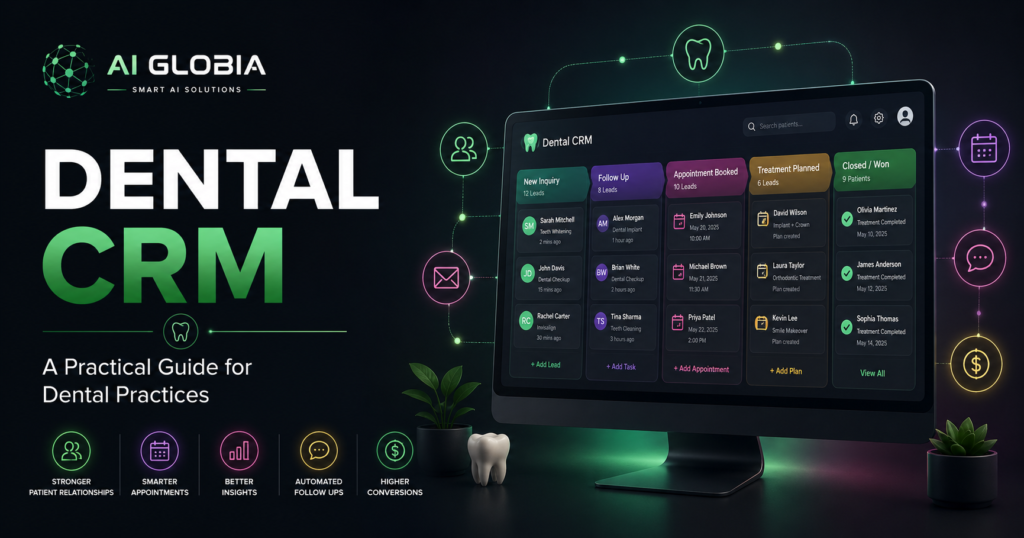
A prospective patient submits an implant inquiry at 7:30 p.m.
Another person calls the practice the next morning, asks about Invisalign, but does not book.
A third patient accepts that they need treatment but wants to discuss the cost with their spouse.
Where does each opportunity go next?
If the answer is a sticky note, someone’s memory, an inbox, or several disconnected systems, the problem is not necessarily a lack of leads. It may be a lack of organized follow-up.
That is where a dental CRM can help.
A dental CRM, or customer relationship management system, helps a dental practice organize prospective patient inquiries, communication, follow-up, appointment opportunities, and relationship-building activities. Unlike practice management software, its primary purpose is not clinical charting or insurance billing. It helps the team understand who needs attention, what happened previously, and what should happen next.
Dental CRM vs. Dental Practice Management Software
This distinction matters because the two systems can overlap without serving exactly the same purpose.
Your practice management software, or PMS, usually handles the core operational and clinical side of the practice. Depending on the platform, this may include patient records, scheduling, charting, treatment plans, insurance, billing, and reporting.
A CRM focuses more heavily on the relationship and conversion journey.
Think of it this way:
PMS: What is happening with this patient’s care and practice record?
CRM: What is the next communication or conversion action for this person?
For example, your PMS may show that a patient has an unscheduled treatment plan. A connected CRM workflow might place that patient into an appropriate follow-up process, assign responsibility, record communication attempts, and show whether the treatment eventually gets scheduled.
For a deeper explanation of the operational side, see our guide to dental practice management software.
What Should a Dental CRM Actually Track?
A useful dental CRM should provide more than a database of names and phone numbers.
At minimum, your team should be able to answer five questions quickly.
1. Where Did the Inquiry Come From?
Was it Google Ads, organic search, Instagram, a website form, a phone call, a referral, or another source?
Without source tracking, a practice can spend money generating inquiries without knowing which channels produce meaningful opportunities.
2. What Does the Person Need?
An emergency caller, an implant lead, and an existing patient overdue for recall should not all be treated as identical contacts.
The CRM should make the person’s reason for contacting the practice clear enough for the team to take an appropriate next step.
3. What Stage Are They In?
A simple pipeline might include:
- New inquiry
- Contact attempted
- Conversation started
- Appointment offered
- Appointment booked
- No response
- Follow-up required
- Closed or not moving forward
The exact stages matter less than making them understandable to the team.
4. What Happened Last?
If a patient says, “I spoke with someone yesterday,” your team should not have to search through several systems to discover what was discussed.
Useful CRM history may include calls, messages, notes, appointment activity, and follow-up tasks.
5. What Needs to Happen Next?
This is where a CRM becomes operationally valuable.
A record without a next action is often just stored information.
A good workflow tells the team whether someone needs a call, message, appointment confirmation, treatment follow-up, recall contact, or no further action.
The 24 Hour Lead Test
Here is a simple exercise for a dental practice owner.
Pick five recent prospective patient inquiries.
For each one, ask:
When did the inquiry arrive?
How quickly did someone respond?
Who owned the follow-up?
How many attempts were made?
Did the person book?
If not, do we know why?
If answering those questions requires checking the phone system, email, website forms, staff notes, and someone’s memory, your patient acquisition process may be fragmented.
A CRM should reduce that uncertainty.
It does not create good front desk processes by itself. It gives those processes a place to live.
Where Automation Becomes Useful
Not every CRM action should be automated.
A nervous patient asking detailed treatment questions may need a thoughtful human conversation.
But repetitive administrative steps can often be supported by automation.
Examples include acknowledging a new inquiry, reminding the team about an untouched lead, sending an appropriate appointment reminder, creating a follow-up task, or moving an opportunity to the correct stage after a defined event.
AI Globia’s CRM Automation service is designed around this type of connected workflow, from first inquiry through booking and follow-up.
The goal is not to remove people from patient relationships.
The goal is to prevent routine process gaps from deciding whether a patient receives a response.
A Practical Dental CRM Workflow
Consider a prospective implant patient who submits a website form.
Step 1: Capture
The inquiry enters the CRM with the patient’s contact information, source, treatment interest, and time of inquiry.
Step 2: Assign
The opportunity is assigned to the appropriate team member or workflow.
Step 3: Respond
The practice acknowledges the inquiry and begins the appropriate conversation.
Step 4: Track
If the patient does not book immediately, the record remains visible instead of disappearing into an inbox.
Step 5: Follow Up
A task or appropriate automated workflow helps ensure the patient receives reasonable follow-up.
Step 6: Book
Once the appointment is scheduled, the opportunity moves to the booked stage.
AI Globia’s AI Booking and Scheduling service is designed to support this booking layer around the systems a practice already uses.
Step 7: Measure
The practice can now evaluate more than lead volume.
It can examine where inquiries originate, how quickly they receive attention, which opportunities book, and where the process tends to break down.
That is much more useful than simply knowing that a campaign generated 50 leads.
CRM Automation Still Needs HIPAA Review
Dental practices should not assume that any popular CRM is automatically appropriate for every patient-data workflow.
The important question is what information the system creates, receives, maintains, or transmits and how it is being used.
The official HHS guidance on HIPAA and cloud computing explains that a cloud service provider handling electronic protected health information on behalf of a covered entity can be a business associate and may need an appropriate business associate agreement and safeguards.
For a dental practice evaluating a CRM, practical questions include:
- Will protected health information enter this platform?
- Does the vendor support the practice’s HIPAA requirements?
- Is an appropriate Business Associate Agreement available when required?
- Who can access patient information?
- Are user permissions configurable?
- How is information protected and backed up?
- Which connected apps can access the data?
- What happens to the data if the practice leaves the platform?
Do not treat “HIPAA compliant” as a checkbox on a sales page. Understand how the actual workflow is configured.
Seven Questions to Ask Before Choosing a Dental CRM
Before buying software, ask the vendor to demonstrate your real workflow rather than only showing polished dashboards.
1. Can it work with our existing PMS?
Replacing a functioning practice management system solely to add CRM capability may create unnecessary disruption.
2. Can it capture inquiries from our important channels?
Consider calls, forms, chat, paid campaigns, social messages, and other sources your practice actually uses.
3. Can our front desk understand it quickly?
If the system is too complicated, employees may stop updating it.
4. Can we see who needs follow-up today?
A CRM should make the next action easier to identify.
5. Can we measure inquiry-to-booking performance?
The practice should be able to move beyond lead counts toward booked patient opportunities.
6. Can workflows be customized?
An implant consultation may need a different process from an emergency call or routine recall.
7. What happens if we leave?
Understand data ownership, exports, integrations, contract terms, and migration options before the CRM becomes central to your workflow.
Do You Actually Need a Dental CRM?
Not every practice needs another software platform.
If your current PMS and communication tools already give your team clear ownership, consistent follow-up, reliable tracking, and useful reporting, adding a CRM could simply create more complexity.
A CRM becomes more useful when opportunities are arriving from multiple channels, staff members cannot easily see what needs follow-up, marketing attribution is unclear, or valuable inquiries repeatedly disappear between first contact and booking.
The decision should therefore begin with the workflow problem.
Do not buy software first and search for a use case later.
Frequently Asked Questions
What is a dental CRM?
A dental CRM is a system for organizing prospective patient relationships, inquiries, communication, follow-up, pipeline stages, and conversion activity.
Is a dental CRM the same as dental practice management software?
No. They can overlap, but PMS software generally focuses on clinical and practice operations, while CRM software focuses more heavily on communication, relationships, lead management, and follow-up.
Can a dental CRM help with missed leads?
It can help by creating clear records, ownership, follow-up tasks, pipeline visibility, and automation. The result still depends on how well the practice designs and follows its process.
Should every dental practice use a CRM?
No. A practice should add one when it solves a clear operational or patient acquisition problem rather than simply because CRM software is available.
Can a dental CRM automate follow-up?
Many CRM platforms support workflow automation, reminders, tasks, and messaging integrations. Practices should configure these carefully around patient experience, consent, privacy, and applicable regulations.
Conclusion
A dental CRM should answer a simple operational question:
Who needs attention next?
The best system is not necessarily the one with the most automation or the biggest dashboard.
It is the one that helps your team capture opportunities, understand context, take the next appropriate action, follow up consistently, and measure what happens between an inquiry and a booked appointment.
Start by mapping your current patient journey.
Find the points where information or follow-up gets lost.
Then decide whether a CRM can close those gaps.
For more practical guidance on dental automation and practice growth, visit the AI Globia Blog or explore AI Globia to see how patient acquisition, front desk workflows, booking, follow-up, and reporting can work as one connected system.
Leave a Reply